
Julia Set Generator
Draw Julia sets by choosing the constant c, zoom into them and download the image.
This is a free online Julia set generator. Choose the complex constant c and watch the fractal change shape completely: a rabbit, a dendrite, a spiral galaxy or a cloud of dust, all from the same formula. Then zoom in with the mouse wheel and download the result as a PNG image.
A Julia set is drawn with the same iteration as the Mandelbrot set, but the roles are exchanged: here c is fixed for the whole image, and every pixel is a different starting point. That single constant is the only thing that decides the shape, which makes this tool an infinite family of fractals instead of just one.
Everything is calculated by your own browser. No image is uploaded to a server, and nothing needs to be installed.
Fractal options
Use the mouse wheel over the image to zoom in and out where the pointer is, and drag the image to move it. On a phone, use one finger to move the image and two fingers to zoom.
How to generate a Julia set image?
To create and save your own Julia set, follow these steps:
- Choose the constant c - This is the important one: it decides the whole shape of the fractal. Start from the list of famous constants (Douady rabbit, dendrite, San Marco, Siegel disk, spirals, galaxies, lightning, feathers), then type your own values in "c (real part)" and "c (imaginary part)".
- Change c in small steps - Moving c by a hundredth is enough to turn a rabbit into something completely different. The most interesting constants are the ones close to the border of the Mandelbrot set.
- Zoom with the mouse wheel - Every notch magnifies the image 1.3 times around the pointer. Drag the image with the mouse to move around, or use one finger on a touch screen and two fingers to pinch.
- Raise the iterations - The filaments of a Julia set are thin, and they only appear when the points around them have enough steps to escape. Keep "Increase the iterations when zooming in" turned on, or type a higher value.
- Choose the colors - Pick a palette and adjust the color cycles and the offset. The inside of the set, when it has one, is painted with a single color that you can change.
- Choose the resolution - Select a common resolution or type any width and height, up to 4K.
- Download the image - Click "Download PNG image" to save exactly what you see.
Settings
Below are the parameters you can configure to draw a Julia set.
| Field | Description |
|---|---|
| Famous constants | A list of values of c that produce the Julia sets people usually draw, each one with its traditional name. Choosing one fills the two fields below. |
| c (real part) | The real part of the constant c, which is the same for every pixel of the image. Interesting values are between -2 and 0.5. |
| c (imaginary part) | The imaginary part of the constant c. Changing the sign produces the same fractal mirrored vertically. |
| Center (real part) and Center (imaginary part) | The complex number at the center of the image. Every Julia set is symmetric around the origin, so the default center of 0 + 0i shows the whole fractal. |
| Zoom | The magnification of the view. The mouse wheel changes this value, magnifying the image where the pointer is. |
| Maximum iterations | How many times the formula is applied to each pixel before deciding that the point never escapes. Julia sets made of thin filaments need more iterations than the ones with a solid body. |
| Increase the iterations when zooming in | Raises the iterations automatically as the magnification grows. |
| Palette, Color cycles, Color offset | The sequence of colors used for the points that escape, how many times it repeats every 256 iterations, and where the sequence starts. |
| Smooth coloring | Removes the visible steps between the color bands by using the fractional iteration count. |
| Invert the palette | Reads the palette backwards. |
| Color of the inside of the set | The color of the points that never escape. Dust-like Julia sets have almost no interior, so this color is barely visible in them. |
| Resolution / Width / Height | The size of the generated image in pixels. |
What is a Julia set?
Fix a complex number c. For every starting point z0 of the plane, apply
zn+1 = zn² + c
over and over. Some starting points produce a sequence that stays bounded forever, and others produce one that runs away to infinity. The filled Julia set of that c is the collection of starting points that stay bounded, and the Julia set itself is the border between the two behaviours. In this tool, each pixel of the image is one starting point z0, and its color says how many steps it needed to run away.
Julia sets are named after the French mathematician Gaston Julia, who studied them in 1918, at the same time as Pierre Fatou, and decades before any computer could draw one.
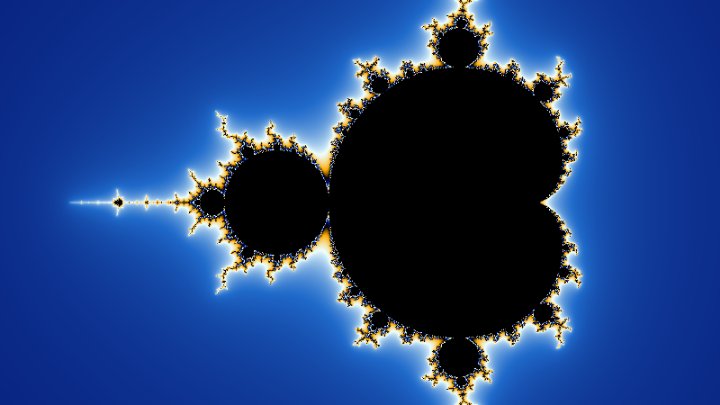
A remarkable fact discovered by Mandelbrot ties the two fractals together: the Julia set of a constant c is a single connected piece exactly when c belongs to the Mandelbrot set, and it falls apart into infinitely many disconnected points, called Fatou dust, when c is outside it. The Mandelbrot set is, in that sense, a map of all Julia sets: the constants near its border produce the most intricate shapes, and the ones far outside produce dust.
Famous values of the constant c
These are the constants offered in the list above the image. Try the ones close to the border of the Mandelbrot set: they produce the most decorated fractals.
| Name | Value of c | What you see |
|---|---|---|
| Douady rabbit | -0.123 + 0.745i | Round bodies with two ears, repeated at every scale. It is the most recognizable Julia set of all. |
| Dendrite | 0 + 1i | A tree of branches with no interior at all: the filled set is only the branches themselves. |
| San Marco | -0.75 + 0i | A chain of bodies that Mandelbrot compared to the basilica of San Marco reflected in the water of Venice. |
| Siegel disk | -0.391 - 0.587i | A set built around a region where the iteration turns forever without escaping and without converging. |
| Spirals | -0.8 + 0.156i | Long arms that curl into spirals joined by thin bridges. |
| Galaxies | -0.7269 + 0.1889i | Delicate filaments that look like arms of a spiral galaxy. There is almost no interior. |
| Lightning | 0.285 + 0.01i | A dense web of bubbles connected at single points. |
| Feathers | -0.4 + 0.6i | Branches covered with smaller branches, like the barbs of a feather. |
Frequently Asked Questions (FAQ)
Is this Julia set generator free to use?Yes, this tool is 100% free and works directly in your browser, with no installation and no sign-up required.
Are the images uploaded to a server?No. Everything is calculated by your own browser and the image never leaves your computer.
Can I use the generated images in my own projects?Yes. The images come from a mathematical formula and you are free to use them in websites, wallpapers, posters, videos, games and printed material.
How many different Julia sets are there?One for every complex number c, so infinitely many. Every value you type in the two constant fields gives a different fractal, and small changes of c produce very different shapes.
Which values of c should I try?The interesting ones are close to the border of the Mandelbrot set. Good hunting grounds are the real values between -2 and 0.25, and the values with a small imaginary part near -0.75 or near 0.25. Constants far from the set produce dust, which looks like a spray of isolated specks.
Why is my image almost empty?The constant c is probably far outside the Mandelbrot set, so the Julia set is disconnected dust with almost nothing to draw. Move c closer to zero, or pick one of the famous constants from the list.
Why does the fractal look like a smudge when I zoom in?The number of iterations is too low for that magnification. Raise "Maximum iterations", or leave "Increase the iterations when zooming in" turned on.
Are Julia sets symmetric?Yes. Every Julia set of this formula is symmetric around the origin: rotating the image by 180 degrees gives exactly the same picture. That is a direct consequence of z and -z having the same square.
How is this different from the Mandelbrot set?The formula is identical. In the Mandelbrot set the starting point is always z = 0 and each pixel is a different c, so one single image summarizes the whole family. In a Julia set, c is fixed and each pixel is a different starting point, so you get one image per constant.
How deep can I zoom?Up to a magnification of about 1013. Beyond that, the 64 bit numbers of the browser cannot separate two neighbor pixels and the image breaks into flat blocks.
Related tools