
Maze Generator
Generate random mazes with 11 maze algorithms and 4 types of maze, and download them as PNG images.
This free online maze generator creates a random maze every time you click a button, and lets you download it as a PNG image, ready to print. Choose the type of maze (rectangular, hexagonal, triangular or circular), choose the algorithm used to generate it (recursive backtracker, Prim, Kruskal, Wilson, Aldous-Broder, hunt-and-kill, growing tree, binary tree, sidewinder, Eller or recursive division), and adjust the size, the colors and the thickness of the walls.
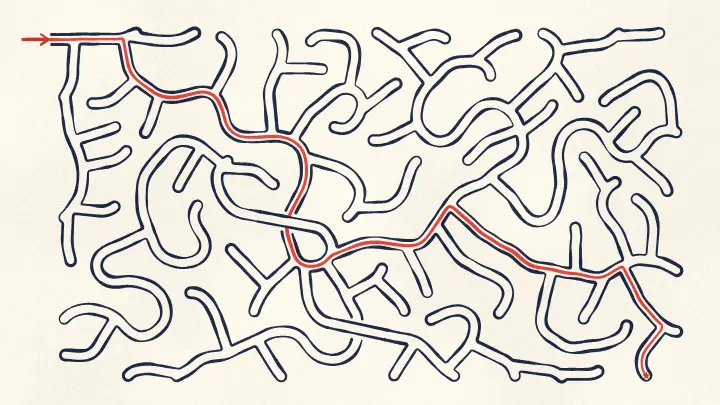
Every maze generated by this tool is perfect: there is exactly one path between any two cells, and therefore exactly one solution, unless you use the "remove dead ends" option. You can also show the solution of the maze, which is useful to print an answer key next to the puzzle.
Everything runs directly in your browser: nothing is uploaded to a server.
Maze options
The maze image is 100 x 100 pixels. The checkered squares show the transparent areas of the image: they are not part of the downloaded PNG file.
How to generate a maze?
To create your random maze, follow these simple steps:
- Choose the type of maze - Rectangular (the classic maze of square cells), hexagonal (a honeycomb of six sided cells), triangular (also called a delta maze) or circular (also called a theta maze, where you walk from the outside to the center).
- Choose the algorithm - Every maze algorithm has its own personality: some of them create long and winding corridors, and others create many short dead ends. See the table below for the description of each one.
- Choose the size of the maze - Set the number of columns and rows (or the number of rings, in a circular maze) and the size of the cell in pixels. The size of the image is calculated automatically.
- Click "Generate a new maze" - Every click picks a new random seed and generates a completely new maze. Write down the seed if you want to generate exactly the same maze again later.
- Customize the look (optional) - Change the thickness and the color of the walls, the background color (or make it transparent), the margin around the maze, and the colors of the start and of the end.
- Show the solution (optional) - Turn on "Show the solution" to draw the shortest path from the entrance to the exit, and download a second image to use as the answer key.
- Download the maze - Click "Download maze image" to save the maze as a PNG file.
Types of maze
The type of maze defines the shape of the cells and how they are connected. The algorithm is applied to the cells, so every algorithm of this tool that does not depend on a square grid can be used with all the types of maze.
| Type of maze | Description |
|---|---|
| Rectangular (orthogonal) | The classic maze: a grid of square cells, where each cell has up to 4 neighbors (north, east, south and west). The entrance is at the top left corner and the exit is at the bottom right corner. It is the type used in almost every printed maze puzzle. |
| Hexagonal (sigma) | A honeycomb of hexagons, where each cell has up to 6 neighbors. The extra directions make the maze harder to solve, because at every cell there are more ways to go wrong. Hexagonal mazes are also called sigma mazes. |
| Triangular (delta) | A grid of triangles that point up and down alternately, where each cell has up to 3 neighbors. With only 3 directions per cell the corridors change direction all the time, which creates a very distinctive zigzag look. |
| Circular (theta) | Concentric rings divided into cells. You start at the outer border and the goal is the cell at the center. The number of cells of a ring is doubled (or tripled) every time the cells of the ring become too wide, so every cell keeps approximately the same size. |
Maze generation algorithms
All the algorithms below generate a perfect maze: a maze where every cell can be reached from every other cell, and where there is exactly one path between any two cells. In other words, a perfect maze is a spanning tree of the grid. What changes from one algorithm to another is the texture of the maze: the length of the corridors, the number of dead ends, how often the corridors change direction, and whether the maze has a visible bias in some direction.
| Algorithm | Description |
|---|---|
| Recursive backtracker (depth-first search) | Walks through the grid carving passages to random unvisited cells, and goes back through its own path every time it gets stuck. It creates long and winding corridors with few dead ends, and it is the fastest algorithm of this tool on large mazes. It is a great default choice for printable mazes. |
| Randomized Prim's algorithm | Grows the maze from a single cell, always connecting a random cell of the frontier (the cells that touch the maze but are not part of it yet). It produces short corridors and many dead ends, with a texture that spreads out from the starting cell like a stain. |
| Randomized Kruskal's algorithm | Shuffles all the walls of the grid and removes the ones that connect two parts of the maze that are not connected yet, using a disjoint set (union find) structure. The result looks very uniform and random, with no bias in any direction, and with many short dead ends. |
| Wilson's algorithm | Adds one random path at a time, erasing the loops it creates on the way (a loop erased random walk). It is unbiased: every possible maze of the grid has exactly the same chance of being generated. It is slow at the beginning, when most of the grid is still empty, and gets faster as the maze grows. |
| Aldous-Broder algorithm | Walks completely at random through the grid, carving a passage every time it reaches a cell it never visited before. Like Wilson's algorithm it is unbiased, but it is slow at the end, when it wanders for a long time looking for the last unvisited cells. |
| Hunt-and-kill algorithm | Walks randomly until it gets stuck, then hunts for the first unvisited cell that touches the maze and starts a new walk from there. It is similar to the recursive backtracker, but it uses no stack, and the hunting phase leaves a subtle texture of corridors that follow the scanning order. |
| Growing tree algorithm | Keeps a list of active cells and always grows the maze from one of them. The newest cell bias option controls which cell is chosen: 100% always takes the newest cell, which is exactly the recursive backtracker, and 0% takes a random cell, which is exactly the Prim's algorithm. Any value in between mixes the two textures. |
| Binary tree algorithm (rectangular mazes only) | For every cell, it carves a passage to the north or to the east, chosen at random. It is the simplest and fastest maze algorithm, but it has a strong diagonal bias and it always leaves a straight corridor along the north border and another one along the east border. |
| Sidewinder algorithm (rectangular mazes only) | Builds the maze row by row: cells are added to a run, and every time a run is closed, one of its cells is connected to the row above. It still leaves a corridor along the north border, but the rest of the maze looks much more natural than the binary tree. |
| Eller's algorithm (rectangular mazes only) | Builds the maze one row at a time, keeping the cells of each row in sets and connecting at least one cell of every set to the next row. It only needs one row in memory, so it is the algorithm used to generate mazes of unlimited size. |
| Recursive division (rectangular mazes only) | The only algorithm of this tool that builds walls instead of carving passages: it starts with a single empty room, splits it with a wall that has one passage, and repeats the process on both halves. It creates a very recognizable pattern of long straight walls and rectangular rooms. |
Options
Below are all the options you can configure when generating a maze.
| Field | Description |
|---|---|
| Type of maze | The shape of the cells of the maze: rectangular, hexagonal, triangular or circular. See the table of the types of maze above. |
| Algorithm | The algorithm used to generate the maze. Four of them (binary tree, sidewinder, Eller and recursive division) need the north, east, south and west directions of a square grid, so they are only available for rectangular mazes. |
| Newest cell bias | Only used by the growing tree algorithm: the chance of growing the maze from the newest active cell instead of a random one. 100% gives the recursive backtracker and 0% gives the Prim's algorithm. |
| Columns and rows | The number of cells of the maze, horizontally and vertically. They are not used by the circular mazes. |
| Rings | Only used by the circular mazes: the number of concentric rings, counting the cell of the center. The number of cells of each ring is calculated automatically, so all the cells keep a similar size. |
| Cell size / Ring height | The size of one cell in pixels: the side of the square, the width of the hexagon, the side of the triangle, or the height of a ring in a circular maze. The size of the image is calculated from it. |
| Remove dead ends | The percentage of the dead ends that are removed by connecting them to a neighbor cell. With 0% the maze is perfect and has a single solution. With a higher percentage the maze becomes a braid maze, full of loops and with more than one solution, which feels quite different to solve. With 100% every dead end is removed. |
| Seed | The number that defines the maze. The same seed, with the same type, algorithm and size, always generates exactly the same maze, so you can reproduce a maze later. The button "Generate a new maze" simply picks a new random seed. |
| Wall thickness | The thickness of the walls in pixels. Thin walls (1 or 2 pixels) look good on the screen, and thicker walls are easier to follow on paper. |
| Wall color | The color of the walls of the maze. |
| Rounded walls | Draws the walls with round ends and round corners, which makes the corners of the maze look softer. Turn it off for sharp corners. |
| Margin | The empty space, in pixels, between the maze and the border of the image. |
| Transparent background | Generates the maze with a transparent background, so you can place it over any background later. Turn it off to fill the image with a background color. |
| Open the entrance and the exit | Removes one wall of the border to create the entrance and one wall to create the exit. In a circular maze, only the entrance is opened, because the goal is the cell at the center. |
| Mark the start and the end | Draws a colored dot at the start cell and another one at the end cell, so it is clear where the maze begins and where it finishes. |
| Show the solution | Draws the shortest path from the entrance to the exit, under the walls of the maze. Use it to generate the answer key of your puzzle. |
| Thickness of the solution | The thickness of the line of the solution, as a percentage of the size of the cell. Use a small percentage for a thin line, or something around 60% to paint the whole corridor. |
Frequently Asked Questions (FAQ)
Is this maze generator free?Yes. The tool is completely free, there is no registration, and the maze is generated by your own browser: nothing is uploaded to a server.
Can I use the generated mazes commercially?Yes. The mazes you generate are yours, and you can use them in puzzle books, worksheets, games, websites or any other project.
Does every maze have a solution?Yes. All the algorithms generate a perfect maze, where every cell is reachable from every other cell, so there is always exactly one path from the entrance to the exit. When you remove the dead ends, the maze gets extra passages and more than one solution, but it stays solvable.
Which algorithm generates the hardest maze?There is no single answer, because the difficulty depends on the size of the maze and on the person solving it. As a rule of thumb, the recursive backtracker generates long corridors and long wrong turns, which makes a maze that takes a long time to solve. Kruskal, Prim and Wilson generate many short dead ends, which makes a maze that feels confusing but where mistakes are discovered quickly. The binary tree is the easiest one, because its diagonal bias means you can almost always go up and to the right.
How do I generate the same maze again?Write down the seed, the type of maze, the algorithm and the size. Typing the same values generates exactly the same maze, pixel by pixel.
How do I print the maze?Download the PNG file and print it from any image viewer or document editor. For a sharp print, use a large cell size (30 pixels or more) so the image has enough resolution for the paper.
How do I generate the answer key?Download the maze with the solution turned off, then turn on "Show the solution" and download the image again, without changing any other option. Both images are exactly the same maze, because the seed did not change.
What is a perfect maze?A perfect maze is a maze with no loops and no unreachable areas: there is exactly one path between any two cells of the maze. In graph theory, it is a spanning tree of the grid of cells.
What is a braid maze?A braid maze is a maze with no dead ends: every corridor leads somewhere. Use the "Remove dead ends" option with 100% to generate one. Braid mazes have loops and usually more than one solution, so they are solved in a very different way from perfect mazes.
In which format is the maze downloaded?The maze is downloaded as a PNG image, which supports transparency. Turn on "Transparent background" if you want to place the maze over another image later.
Related tools