
Elementary Cellular Automaton
Draw the 256 elementary cellular automata, like Rule 30, Rule 90 and Rule 110, directly in your browser.
This free online elementary cellular automaton generator draws any of the 256 elementary cellular automata studied by Stephen Wolfram: a single row of cells, where every cell looks at itself and its two neighbors to decide if it is alive or dead in the next row. Each new generation is drawn below the previous one, so the whole history of the automaton becomes one image.
Choose a rule by its number, from Rule 0 to Rule 255, or edit it visually by clicking on its 8 neighborhoods. Watch Rule 30 turn a single cell into chaos, Rule 90 draw the Sierpinski triangle, and Rule 110, a rule proven to be Turing complete, fill a random row with colliding structures.
Start from a single cell, from a random row or from your own row, choose the size of the image and the colors, and download the result as a PNG image. Everything runs directly in your browser: nothing is uploaded to a server.
Rule: 30 (00011110)Size: 301 cells x 150 generationsLive cells in the last row: 0
How to draw an elementary cellular automaton
- Choose the rule - Pick one of the famous rules, type any number from 0 to 255, or browse all of them with the "Previous" and "Next" buttons. The "Random rule" button is a quick way to discover rules you never heard of.
- Edit the rule visually - Each of the 8 boxes shows a neighborhood of 3 cells and, below it, the cell it creates in the next row. Click a box to switch that cell between alive and dead, and the number of the rule changes with it.
- Choose the first row - Start from a single live cell in the center to see the pure shape of the rule, from a random row to see how it behaves with noise, or type your own row of zeros and ones.
- Choose the edges - Decide what the cells at both ends of the row see beyond the border: the other end of the row, dead cells or live cells.
- Set the size - Choose the number of cells per row, the number of generations (the rows of the image) and the size of each cell in pixels.
- Customize the colors - Pick the colors of the live and dead cells, or paint the live cells with a gradient from the top to the bottom of the image.
- Download the image - Click "Download image" to save the result as a PNG image, with the exact size shown below the size options.
What is an elementary cellular automaton?
An elementary cellular automaton is the simplest possible cellular automaton: a single row of cells, where every cell is either alive (1) or dead (0). To compute the next row, each cell looks at a neighborhood of 3 cells: its left neighbor, itself and its right neighbor. The rule says, for each of the 8 possible neighborhoods, if the new cell is alive or dead.
Those 8 answers form an 8 bit binary number, which is the number of the rule. That naming was introduced by Stephen Wolfram in 1983. For example, Rule 30 is 00011110 in binary:
| Neighborhood | 111 | 110 | 101 | 100 | 011 | 010 | 001 | 000 |
|---|---|---|---|---|---|---|---|---|
| New cell (Rule 30) | 0 | 0 | 0 | 1 | 1 | 1 | 1 | 0 |
Reading the second line as a binary number gives 00011110, which is 30 in decimal. There are 28 = 256 ways to fill that line, so there are exactly 256 elementary cellular automata. Many of them are mirror images or color inversions of each other, and only 88 of them are really different.
The four classes of Wolfram
Starting from a random row, Wolfram sorted the behavior of the rules into four classes:
| Class | Behavior | Examples |
|---|---|---|
| Class 1 | Every cell quickly becomes the same, and the image turns into one solid color. | Rule 0, Rule 32, Rule 255 |
| Class 2 | The row settles into stable or repeating structures, which draw vertical stripes or simple periodic patterns. | Rule 4, Rule 108, Rule 250 |
| Class 3 | Chaos: the pattern looks random forever, full of triangles of every size. | Rule 30, Rule 45, Rule 126 |
| Class 4 | Complex behavior, on the border between order and chaos: localized structures travel and interact over a regular background. | Rule 110 |
The famous rules
| Rule | Description |
|---|---|
| Rule 30 | The most famous chaotic rule. A single cell grows into a triangle full of random-looking triangles, and its center column is so unpredictable that it was used as a random number generator. The same pattern appears on the shell of the Conus textile sea snail. |
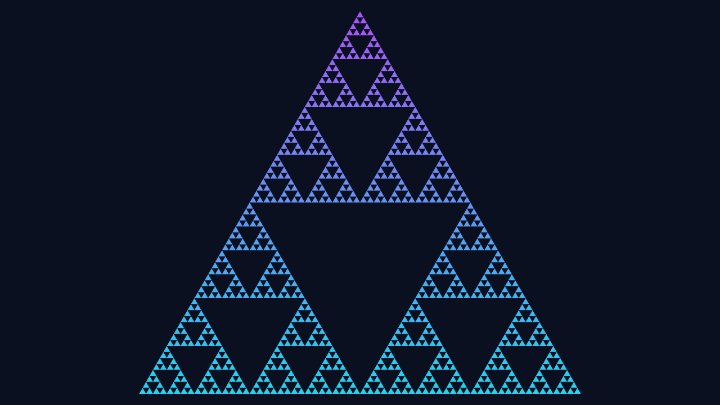
| Rule 90 | Every cell becomes the XOR of its two neighbors. A single cell draws the Sierpinski triangle, one row at a time. |
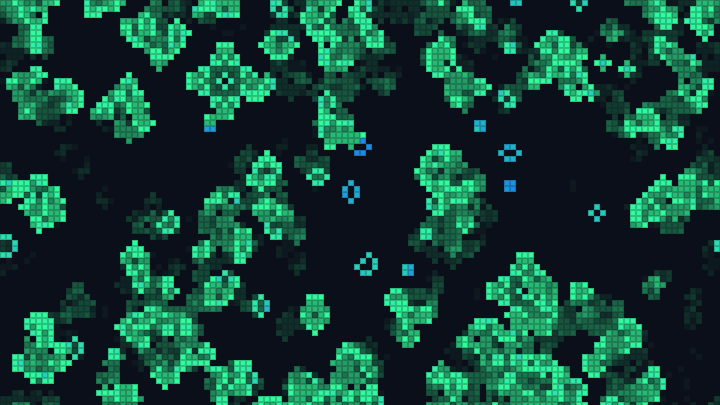
| Rule 110 | The famous complex rule, proven Turing complete by Matthew Cook in 2004. From a random row, small structures travel across a periodic background and collide with each other. |
| Rule 184 | The traffic rule: every live cell is a car that moves one cell to the right when the cell in front of it is empty. From a random row, you can see traffic jams that move backwards. |
| Rule 150 | Every cell becomes the XOR of itself and its two neighbors. A single cell draws a nested fractal of triangles, denser than the Sierpinski triangle. |
| Rule 45 | Another chaotic rule, whose triangle leans to one side and is full of irregular stripes. |
| Rule 60 | Every cell becomes the XOR of itself and its left neighbor, which draws a Sierpinski triangle leaning to the right. |
| Rule 18 | A single cell draws a sparse Sierpinski triangle, while a random row turns into chaotic triangles of every size. |
| Rule 22 | Close to Rule 18: a single cell draws a Sierpinski-like triangle, and a random row gives a chaotic pattern. |
| Rule 126 | A single cell draws a Sierpinski triangle with thick borders, and a random row gives a chaotic lace of triangles. |
| Rule 105 | The opposite of Rule 150: the background flashes between the two colors on every row, around a nested fractal pattern. |
| Rule 250 | A simple rule of class 2: a single cell grows into a triangle painted like a checkerboard. |
Options
Below are all the options you can configure in this elementary cellular automaton generator.
| Field | Description |
|---|---|
| Famous rules | A list of the most interesting rules. Choosing one writes its number in the field below it. |
| Number of the rule | The rule itself, as a number from 0 to 255. Its 8 bits, written in binary, are the cells created by the 8 neighborhoods, from 111 to 000. |
| Neighborhood boxes | A visual editor of the rule. Each box shows 3 cells and, below them, the cell they create in the next row. Clicking a box inverts that cell and changes the number of the rule. |
| First row | The row at the top of the image: a single live cell in the center, a random row, or your own row. |
| Density of the random row | The percentage of live cells in the random row. |
| Seed of the random row | The number used to generate the random row. The same seed always gives exactly the same row, so you can come back to an image you liked. |
| My own row | A row typed with "1" for the live cells and "0" for the dead ones, placed in the center of the first row. |
| Edges of the row | What the cells at both ends of the row see beyond the border. "Wrap around" joins both ends, as if the row were a circle; the other two choices surround the row with dead or live cells. |
| Cells per row | The width of the automaton, in cells. A single cell grows at most one cell to each side per generation, so twice the number of generations plus one is enough to see the whole triangle. |
| Generations | The number of rows of the image. The first row is generation 0. |
| Size of the cell | The size of each cell in pixels. The image is the number of cells per row multiplied by the size of the cell, by the number of generations multiplied by the size of the cell. |
| Color of the live cells | Paints every live cell with one color, or with a gradient that goes from the color at the top to the color at the bottom, generation after generation. |
| Color of the dead cells | The background color of the image. |
Frequently Asked Questions (FAQ)
Is this elementary cellular automaton generator free?Yes. The tool is completely free, there is no registration, and everything is computed by your own browser: nothing is uploaded to a server.
What is Rule 30?Rule 30 is the most famous elementary cellular automaton. Its rule is simple, but a single cell grows into a pattern that looks completely random, and its center column passes many statistical tests of randomness. Stephen Wolfram used it as the random number generator of Mathematica, and a very similar pattern can be seen on the shell of the Conus textile sea snail.
Why does Rule 90 draw the Sierpinski triangle?In Rule 90, each new cell is alive when exactly one of its two neighbors is alive (their XOR). Starting from a single cell, the rows are the numbers of Pascal's triangle modulo 2, and the odd numbers of Pascal's triangle form the Sierpinski triangle.
Is Rule 110 really Turing complete?Yes. Matthew Cook proved in 2004 that Rule 110 can simulate any computation, given the right (and very long) first row. It is one of the simplest systems known to be Turing complete.
Why is the whole image filled with color after the first row?Rules with an odd number turn the neighborhood 000 into a live cell, so the empty background becomes alive in the second row. Most of those rules make the background flash between the two colors, row after row.
Why does the pattern only grow to one side?Some rules are not symmetric: they treat the left and right neighbors differently, so the pattern leans or grows to one side. Rule 110, for example, only grows to the left from a single cell. The mirror image of any rule is another elementary rule: the mirror of Rule 110 is Rule 124.
Can I use the images commercially?Yes. The images you generate are yours, and you can use them in wallpapers, textures, prints, presentations or any other project.
Related tools