
Polyrhythm Generator
Create polyrhythms with animated visualizations and sound, directly in your browser.
This free online polyrhythm generator creates the hypnotic polyrhythm animations you have probably seen on YouTube: a set of nested rings, where every ring plays a different number of notes during the same loop. All the rings start together, slowly drift apart into a cloud of notes, and meet again in a perfect unison at the end of the loop.
Choose between three visualizations (nested arcs, orbiting circles or bouncing bars), pick the musical scale, the root note and the instrument, adjust the colors and the glow, and watch (and listen to) the pattern evolve. You can download the animation as a video, download the audio as a WAV file, and save any frame as a PNG image.
Everything runs directly in your browser, using the Web Audio API: nothing is uploaded to a server.
Browsers only allow a page to play audio after you interact with it, so the animation starts without sound.
Time: 0.0 s | Loop: 1
How to create a polyrhythm?
To create your own polyrhythm animation, follow these simple steps:
- Click "Turn on the sound" - The animation already runs when the page opens, but the sound only starts after you click a button, because browsers do not allow a page to play audio before you interact with it.
- Choose the visualization - Nested arcs (the classic polyrhythm animation), orbiting circles, or bouncing bars. All of them play exactly the same rhythm, they only show it in a different way.
- Choose the number of rings - Every ring is one voice of the polyrhythm, and it plays one note of the scale. Few rings give a rhythm you can follow; many rings give the "raining notes" texture of the videos.
- Set the notes per loop - The fastest ring (the smallest one) plays the number of notes you choose during one loop, and each of the next rings plays fewer notes. That difference is what makes the rings drift apart and meet again.
- Set the loop duration - This is the time the rings take to line up again in a perfect unison. Short loops (20 to 40 seconds) are good to hear the whole cycle; long loops (several minutes) give the slow, meditative version.
- Choose the scale and the instrument - The rings are spread over the scale you choose, one degree per ring, going up one octave every time the scale is finished. Pentatonic scales never sound wrong, whatever the rhythm is doing.
- Adjust the colors and the glow - Pick a palette, turn on the motion trails, and increase the glow for the neon look of the animations you see on YouTube.
- Download it - Save the current frame as a PNG image, or generate a video of the animation and download the audio as a WAV file to join both in a video editor.
What is a polyrhythm?
A polyrhythm is two or more rhythms played at the same time, where the beats do not line up. The simplest example is the 3:2 polyrhythm, also called a hemiola: one voice plays 3 notes while the other plays 2, in exactly the same amount of time. The two voices only meet again at the beginning of the next bar.
This tool takes that idea to its extreme. Instead of two voices it uses up to 40, and instead of a simple ratio like 3:2 it uses a full sequence, for example 32:31:30:29 and so on. Because each ring completes a whole number of trips during the loop, all of them are perfectly aligned at the start and at the end of the loop, and everything in between is the slow and beautiful drift from unison to chaos and back.
The visual part follows exactly the same idea: the ball of each ring travels from one end of its track to the other, and plays its note when it arrives. Since every ring has its own speed, the balls start together, spread into a wave, then into a cloud, and finally line up again — which is why the animation and the music always feel connected.
The visualizations
| Visualization | Description |
|---|---|
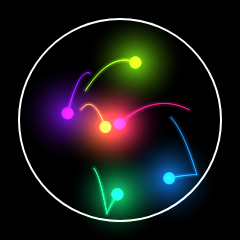
| Nested arcs (semicircles) | The classic polyrhythm animation: half circles of increasing size share the same center, and a ball travels back and forth along each arc. A note is played every time a ball reaches one of the two ends of its arc, on the impact line. The smallest arc is the fastest one. |
| Orbiting circles | Full circles instead of arcs, with a ball orbiting around the center of each one. The note is played every time the ball completes a turn and crosses the top of the circle. It looks like a planetary system where each planet has its own year. |
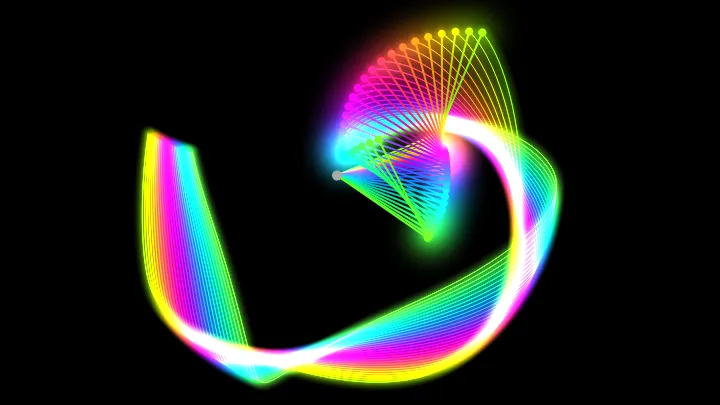
| Bouncing bars | The arcs unrolled into straight horizontal lines, stacked one above the other, with a ball bouncing between the two walls of each line. It is the same rhythm seen as a pendulum wave, and it is the easiest visualization to read when you use many rings. |
Options
Below are all the options you can configure when generating a polyrhythm.
| Field | Description |
|---|---|
| Visualization | The shape of the animation: nested arcs, orbiting circles or bouncing bars. It changes only the drawing, never the rhythm or the notes. |
| Number of rings | How many voices the polyrhythm has. Each ring has its own speed, its own note and its own color. With 2 or 3 rings you get a classic polyrhythm that you can count; with 20 or more you get the dense texture of the polyrhythm videos. |
| Notes per loop of the fastest ring | The number of notes played by the first (smallest and fastest) ring during one loop. All the other rings play fewer notes than this one. |
| Notes of difference between two rings | How many notes per loop are removed from one ring to the next. With the value 1 and 14 rings starting at 32, the rings play 32, 31, 30 ... 19 notes per loop. Larger values make the rings separate much faster. |
| Loop duration | The number of seconds of one complete loop: the time the rings take to meet again in a perfect unison. Every ring plays all its notes inside this time, so a longer loop means a slower rhythm. |
| Play the sound | Turns the audio on and off. The animation keeps running when the sound is off, which is useful to record a silent video. |
| Instrument | The sound of the notes: a simple synth, an FM synth (bell like), an AM synth (soft and round), a plucked string, or a membrane (a drum, where the pitch of the note is still audible). |
| Waveform | Only used by the simple synth: the shape of the wave of the oscillator. Sine and triangle are soft, square and sawtooth are bright and buzzy. |
| Scale | The musical scale used to give one note to each ring. The rings are spread over the degrees of the scale, going up one octave every time the scale is finished. The pentatonic scales have no dissonant interval, so they always sound good, whatever notes happen to play together. |
| Root note and octave | The note where the scale starts, and how low it starts. A low octave with many rings gives a wide range, from a deep bass to a high bell. |
| The fastest ring plays the highest note | Turned on, the small and fast rings play high notes and the large and slow ones play the bass, which is the usual choice. Turned off, the order is inverted. |
| Duration of the notes | How long each note is held, in seconds. Short notes give a percussive, dry rhythm; long notes overlap and build chords. |
| Velocity of the notes | How hard each note is played. It changes the volume of the note, and also its timbre on the instruments that react to the velocity. |
| Volume | The volume of the instruments, in decibels. A limiter protects the output from clipping when all the rings play at the same time. |
| Stereo spread | Spreads the rings between the left and the right speaker: the first ring goes to the left, the last one to the right. Use headphones to hear the effect. |
| Reverb and reverb decay | The amount of reverb added to the sound, and how long it takes to disappear. A long reverb turns the polyrhythm into an ambient texture. |
| Image width and height | The size of the animation in pixels. It is also the size of the PNG image and of the video that you download. |
| Background color | The color painted behind the rings. A very dark color makes the glow of the rings much more visible. |
| Motion trails | Instead of erasing the previous frame, the background is painted with a low opacity, so the balls leave a trail behind them. The length of the trail controls how fast the old frames disappear. |
| Palette | The colors of the rings. Every palette is a range of the color circle, walked from the first ring to the last one. Choose "One color" to paint all the rings with the same color, or "Custom gradient" to go from one color of your choice to another. |
| Saturation and lightness | How strong and how bright the colors of the palette are. |
| Radius of the first ring | The size of the smallest ring, as a percentage of the largest one. A small value leaves a big empty space between the first rings; a large value packs all the rings close together. |
| Thickness and opacity of the lines | The look of the track of each ring. A low opacity keeps the tracks discreet, so only the balls and the flashes are visible. |
| Size of the balls | The radius, in pixels, of the ball that travels along each ring. |
| Glow | The size of the neon halo drawn around the rings and the balls. Set it to 0 for a flat look, or to a high value for the glowing look of the polyrhythm videos. |
| Duration of the flash | How long a ring stays lit after playing its note. It also controls the duration of the ripples. |
| Ripples on the impact | Draws a circle that grows and fades out from the point where the ball hit the track, every time a note is played. |
| Show the impact line | Draws the line where the balls of the arcs hit the track and play their notes, and the walls at the ends of the bars. |
| Show the number of notes of each ring | Writes, next to each ring, how many notes it plays during one loop. It is a good way to understand the ratios of the polyrhythm. |
Frequently Asked Questions (FAQ)
Is this polyrhythm generator free?Yes. The tool is completely free, there is no registration, and everything is generated by your own browser: no audio and no image is uploaded to a server.
Why is there no sound?Browsers block the audio of a page until the visitor interacts with it, so the animation starts without sound. Click the "Turn on the sound" button, which appears under the animation and in the options, and the notes start playing immediately, without interrupting the loop. Also check that the option "Play the sound" is on and that the volume is not too low.
How is the audio generated?The notes are synthesized in real time by your browser with the Web Audio API, using the Tone.js library. Every ring has its own instrument and its own position in the stereo image, and the notes are scheduled in advance with the clock of the audio card, so the rhythm stays perfectly precise even if the animation drops a frame.
Can I download the animation as a video?Yes. Open the "Generate and download video" section, turn on "Record audio", click "Generate video", and stop the recording when you have enough. The video is recorded in the WebM format, at exactly the framerate you choose. The audio is not recorded inside the video file: click "Download audio" to get a WAV file with exactly the same notes, and join the two files in any video editor.
Do the video and the downloaded audio have the same speed?Yes, at any framerate. While the video is being recorded, the animation does not follow the clock of your computer: it advances exactly one frame of the chosen framerate at a time, and it waits for every frame to be drawn and encoded. So a 30 second video always contains 30 seconds of the polyrhythm, even if your computer needed several minutes to generate it, and the WAV file lines up with it note by note.
Why is there no sound while the video is being recorded?Because during the recording the animation runs on the clock of the recorder instead of the real time, and the notes cannot be played live at a speed that is not the real one. This does not affect the recording at all: the video is written at exactly the framerate you asked for, and the WAV file you download afterwards contains exactly the notes of the recorded animation. The sound comes back as soon as the recording ends.
Can I download only the audio?Yes. Generate a video of the duration you want and then click "Download audio". The audio is rendered offline, so it is not a recording of your speakers: it is a clean render of the same polyrhythm, in stereo, and it is a couple of seconds longer than the video, so the reverb of the last notes is not cut.
Can I use the animations and the audio commercially?Yes. The images, videos and audio you generate are yours, and you can use them in videos, games, websites or any other project.
What is the difference between a polyrhythm and a polymeter?In a polyrhythm, two or more voices divide the same amount of time into a different number of beats, so the beats do not line up (3 against 2, for example). In a polymeter, all the voices share the same beat, but they group the beats into bars of different lengths. This tool generates polyrhythms: every ring divides the same loop into a different number of notes.
Why do all the rings play together at the beginning?Because every ring plays a whole number of notes during the loop, all of them arrive at the impact line exactly at the same instant when the loop starts. That unison is the reference point of the whole animation: from there, the rings drift apart, and they only meet again at the end of the loop.
How do I get the slow, meditative version?Increase the loop duration to a few minutes, use many rings, choose a pentatonic scale with a low root note, a long note duration and a lot of reverb. The "Slow drift" example is a good starting point.
Does it work on a phone?Yes, but a polyrhythm with many rings and a large glow is heavy to draw, so use fewer rings and a smaller image size if the animation is not smooth.
Related tools