
Barnes-Hut Simulation
Simulate thousands of bodies attracting each other by gravity, with the Barnes-Hut algorithm: spiral galaxies, galaxy collisions, star clusters and more. See the quadtree, and download images and videos.
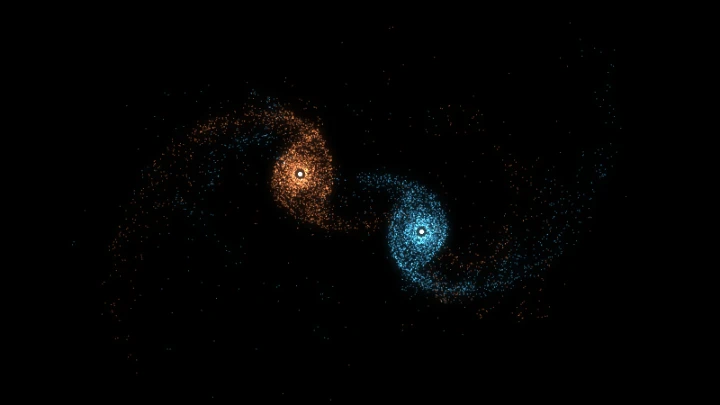
This is an online Barnes-Hut simulation: a gravitational N-body simulation where thousands of bodies (stars, for example) attract each other, and the forces are computed with the Barnes-Hut algorithm.
In a system of n bodies, every body attracts every other body, so computing the forces directly takes n·(n-1) calculations on every step: about 16 million for 4,000 bodies. The Barnes-Hut algorithm organizes the bodies in a quadtree, and treats a group of bodies that is far enough away as a single body placed at the group's center of mass. The cost drops to roughly n·log(n), which is what makes simulations with thousands of bodies run in real time in your browser.
Choose an initial configuration: a spiral galaxy orbiting a black hole, a collision of two galaxies, an unstable rotating disk, a cloud that collapses, merging star clusters, a ring around a black hole, or an expanding universe. Then watch gravity do the rest.
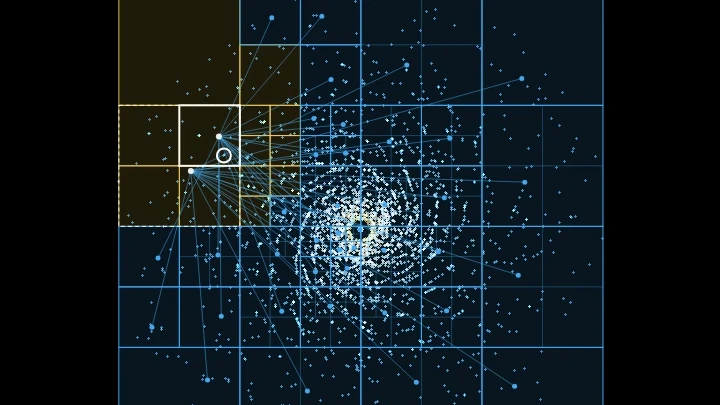
You can also see the algorithm working: draw the quadtree over the simulation, or highlight the cells that were used to compute the force on one body. Change the opening angle theta to trade accuracy for speed, and compare the number of interactions with the direct sum.
While watching the simulation, you can pan, zoom, change the animation speed and customize the visualization: colors by speed, trails, glow and more. Move the camera by clicking and dragging your mouse on the canvas, and zoom by scrolling the mouse wheel on the canvas.
You can also record and download videos of your simulations, in webm format, and download the current animation frame as a PNG image. Everything runs directly in your browser: nothing is uploaded to a server. You are free to share the generated images and videos anywhere. Attribution is not required but appreciated.
Examples
Below you can find some examples of gravitational simulations, and some examples that show how the Barnes-Hut algorithm works. Click on any example to apply the configuration and start the simulation.
Spiral galaxy
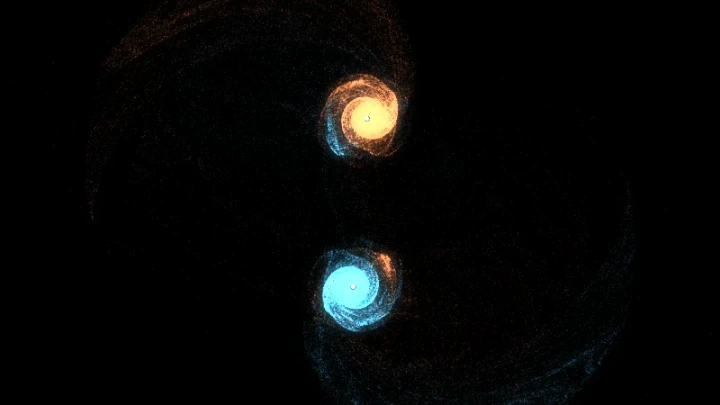
A disk of 4,000 stars orbiting a supermassive black hole. The inner stars orbit faster than the outer ones, which winds the clumps of stars into spiral arms.
Galaxy collision
Two galaxies pass close to each other. Their gravity pulls long tidal tails of stars out of both disks, and some stars are captured by the other galaxy. Zoom out to follow them.
Unstable rotating disk
A flat disk of stars with no black hole, where each star starts on a circular orbit. The disk is unstable: its own gravity breaks it into rings, arms and clumps, which then orbit and merge.
Cold collapse
A uniform cloud of bodies at rest falls onto itself, bounces back and settles into a dense core with a halo, a process called violent relaxation.
Merging star clusters
Eight star clusters attract each other and merge, one after the other, into a single larger cluster, like the hierarchical growth of galaxies.
Ring around a black hole
A thin ring of bodies on circular orbits. The gravity between the bodies of the ring makes small irregularities grow into clumps that orbit together.
Expanding universe
Bodies spread almost uniformly fly apart slower than the escape velocity. As the expansion slows down, gravity gathers them into filaments and clumps.
See the quadtree
A small galaxy of 300 bodies with the quadtree drawn on top. Watch the cells split and merge as the bodies move: every cell holds at most one body.
The force on one body
Shows how the force on one body is computed: the blue cells are far enough to be replaced by their center of mass, and only the yellow lines are computed body by body. Right click the canvas to choose another body.
Exact direct sum (theta = 0)
With the opening angle equal to 0 no cell is approximated, and the simulation computes every one of the n·(n-1) interactions. Compare the interactions per step and the speed with the other examples.
How to create a Barnes-Hut simulation
- Choose the initial configuration - A spiral galaxy, a collision of two galaxies, a rotating disk, a cold collapse, star clusters, a ring around a black hole or an expanding universe. Each configuration loads its recommended radius, masses and velocity factor.
- Adjust the initial conditions (optional) - Change the number of bodies, the radius, the masses, the velocity factor or the random seed.
- Adjust the physics (optional) - Change the opening angle theta, the gravitational constant, the softening and the time step.
- Customize the visualization (optional) - Color the bodies by speed, by galaxy or with a single color, and change their size, the brightness, the trails, the glow and the background.
- Show the quadtree (optional) - Draw all the cells of the quadtree, or only the cells used to compute the force on one body. Right click a body on the canvas to select it.
- Watch the simulation - Use the start, pause, resume and restart buttons. Drag the mouse on the canvas to move the camera, and scroll the mouse wheel to zoom.
- Download the result - Download the current animation frame as a PNG image, or record and download a video of the simulation in webm format.
Configuration parameters
Canvas size
| Field | Description |
|---|---|
| Resolution | The canvas width and height, in pixels. You can select an option from the list of common display resolutions, or use "custom" to choose any width and height. |
| Width | The width of the animation canvas, in pixels. |
| Height | The height of the animation canvas, in pixels. |
Initial conditions
| Field | Description |
|---|---|
| Configuration | The initial arrangement of the bodies:
Choosing a configuration also loads its recommended radius, masses and velocity factor. |
| Number of bodies | The number of bodies (stars) in the simulation, including the central masses. Thanks to the Barnes-Hut algorithm, the cost of each step grows only a bit faster than the number of bodies, so tens of thousands of bodies are possible. The animation becomes slower with very large numbers, but a recorded video always keeps the configured framerate. |
| Radius | The radius of the galaxy, of the disk or of the cloud, in pixels. In the galaxy collision it is the radius of each galaxy, and in the star clusters it is the radius of the region where the clusters are placed. |
| Total mass of the bodies | The mass of all the bodies together, without the central masses. It is divided equally between the bodies, so changing the number of bodies does not change the overall motion: more bodies only make the image more detailed. |
| Central mass (black hole) | The mass of the body at the center of each galaxy, or at the center of the disk or the ring. Use 0 for no central mass. The central masses are drawn as white dots. |
| Number of clusters | The number of star clusters. Only used by the "star clusters" configuration. |
| Velocity factor | Multiplies the initial velocities. In the disk configurations each body starts with the speed of a circular orbit around the mass inside its radius, multiplied by this factor: 1 means circular orbits, a smaller value makes the disk contract, and a larger value makes it expand. In the star clusters, it multiplies the random velocities of the bodies inside each cluster. In the expanding universe, it is the initial expansion speed as a fraction of the escape velocity. In the cold collapse it is 0 by default, and a value greater than 0 makes the cloud rotate. |
| Random seed | The positions of the bodies are random. The same seed always generates the same initial positions, so you can reproduce a simulation. Click the dice button to try a new random seed. |
Physics
| Field | Description |
|---|---|
| Theta (opening angle) | The accuracy parameter of the Barnes-Hut algorithm. A cell of the quadtree with width Smaller values open more cells, which is more accurate and slower. With theta equal to 0 no cell is ever approximated, and the simulation computes the exact direct sum. Values between 0.5 and 1 are the usual compromise. Above 1 the simulation is very fast, but the errors in the forces become visible. |
| Gravitational constant | The strength of gravity (the constant G of Newton's law of gravitation). Greater values make everything move faster. It multiplies all the masses, so doubling it has the same effect as doubling every mass. |
| Softening | A small distance, in pixels, added to the distance between the bodies when computing the force: the force is proportional to Without softening, two bodies passing very close to each other feel an almost infinite force and are thrown away at absurd speeds. Each body then behaves more like a small cloud of stars than like a point, which is what the bodies of a galaxy simulation really represent. |
| Time step | The amount of simulated time advanced on every physics step. Smaller values make the simulation more accurate, but more steps are needed to advance the same amount of time. If bodies are thrown away from the black holes, reduce the time step or increase the softening. |
| Physics steps per frame | The number of physics steps calculated on every animation frame. The time simulated on each frame is the time step multiplied by this value and by the animation speed. |
Visualization
| Field | Description |
|---|---|
| Color | How the bodies are colored:
|
| Body size | The diameter of each body, in pixels. A size of 1 draws each body as a single point, spread over the nearest pixels so it moves smoothly. |
| Brightness | The brightness of each body. The light of the bodies adds up, like in a long exposure photo of the sky, so the dense regions become bright and the sparse regions stay faint. Increase it when there are few bodies, and decrease it when there are many. |
| Show black holes | If enabled, the central masses are drawn as larger white dots. |
| Trails | How much of the previous frame remains visible, from 0 (no trails) to 0.99 (very long trails). The trails are drawn on the canvas, so moving or zooming the camera also leaves a trail. |
| Glow | If enabled, a blurred copy of the bodies is added over the image, which gives the galaxies a soft glow. |
| Glow radius | The radius of the blur of the glow, in pixels. |
| Glow intensity | The strength of the glow, from 0 to 2. |
Quadtree
| Field | Description |
|---|---|
| Show quadtree | Hidden: only the bodies are drawn. All the cells: draws every cell of the quadtree built on the current step. Each cell is split into four smaller cells until every cell holds at most one body, so the cells are small where the bodies are dense. Cells used for the selected body: draws the cells that were treated as a single body when computing the force on the selected body (marked with a white circle), with a line to the center of mass of each cell. The yellow lines go to the bodies close enough to be computed one by one. Right click a body on the canvas to select it. |
| Quadtree color | The color of the cells of the quadtree. |
| Select a random body | Selects another body at random, and shows the cells used to compute the force on it. |
Coordinates
| Field | Description |
|---|---|
| Origin | The coordinates origin (0,0), which is where the center of the galaxy is placed. It can be "top left" or "center". |
| Offset x | The "x" coordinate offset, in pixels. It determines the horizontal position of the "camera". Adjusting this offset lets you shift the view or "move" the camera. |
| Offset y | The "y" coordinate offset, in pixels. It determines the vertical position of the "camera". |
Zoom
| Field | Description |
|---|---|
| Zoom | Changing this parameter allows you to "zoom in" or "zoom out". You can also zoom by scrolling the mouse wheel on the canvas. The bodies keep their size in pixels, only the distances between them change. |
Background
| Field | Description |
|---|---|
| Transparent background | If this option is checked, the animation has a transparent background. |
| Background color | The background color, in hexadecimal value. For example, use #000000 for a black background. |
Animation speed
| Field | Description |
|---|---|
| Animation speed | The speed of the animation. Values greater than 1 mean the animation plays in "fast motion", and values smaller than 1 mean it plays in "slow motion". It changes the number of physics steps per frame, so the accuracy of the simulation stays the same. |
Animation control
| Button or value | Description |
|---|---|
| Start | Start the simulation. |
| Restart | Restart the simulation from the initial conditions. |
| Pause | Pause the simulation. |
| Resume | Resume the simulation. |
| Stop | Stop the simulation. |
| Quadtree cells | The number of cells of the quadtree built on the last step, and its depth (the number of times the root cell was split to reach the smallest cell). |
| Interactions per step | The number of forces computed on the last step, counting each body-body and each body-cell force once. Compare it with the direct sum, which needs n·(n-1) interactions. |
| Physics time per step | The time your computer took to build the quadtree, compute the forces and move the bodies, on each step. |
| Download current animation frame | Download the current animation frame (in PNG format). |
| Reset all the options | Restore every option to its default value and restart the simulation. |
Generate and download video
Instead of only watching the simulations online, you can also record and download videos of your simulations. The simulation videos are generated using the webm extension.
| Field | Description |
|---|---|
| Framerate | The amount of frames per second that you want the video to have. |
| Automatically stop after... | If enabled, the video recording stops automatically after the configured time (in seconds) or after the configured amount of frames. |
How the Barnes-Hut algorithm works
Newton's law of gravitation says that every body attracts every other body with a force proportional to the product of their masses and inversely proportional to the square of the distance between them. To move n bodies one step forward, a simulation needs the total force on each body, and the direct way to get it computes n·(n-1) forces. Doubling the number of bodies makes each step four times slower.
The Barnes-Hut algorithm, published by Josh Barnes and Piet Hut in 1986, is based on a simple observation: a distant group of stars pulls almost exactly like a single star with the total mass of the group, placed at the group's center of mass. On every step, the simulation:
- Builds a quadtree - A square that contains every body is the root of the tree. Any square that contains more than one body is split into four smaller squares (the quadrants), and so on, until every square holds at most one body. In 3D the same idea uses cubes split into eight, an octree.
- Computes the mass of each cell - Each cell stores the total mass of the bodies inside it and their center of mass.
- Computes the force on each body - Starting from the root, the simulation looks at each cell. If the ratio between the width of the cell and its distance to the body is smaller than theta, the whole cell is treated as a single body at its center of mass. Otherwise, the simulation looks inside the cell, at its four children. The near bodies are computed one by one, and the far away ones in large groups.
- Moves the bodies - The velocities and the positions are updated with the leapfrog integrator (kick-drift-kick), which is time-reversible and keeps the energy of the orbits stable over long simulations.
Because the size of the cells grows with the distance, each body interacts with a number of cells that grows only with the logarithm of the number of bodies, and the total cost of a step is about n·log(n). For 4,000 bodies that means roughly 100 to 150 interactions per body, instead of 3,999.
This tool simulates a flat (2D) universe, where the bodies move on a plane but attract each other with the usual inverse square law. Real galaxies are three dimensional, but their disks are thin, so a 2D simulation already reproduces many of their features: spiral arms, bars, tidal tails and mergers.
Frequently Asked Questions (FAQ)
What is a Barnes-Hut simulation?It is an N-body simulation, where many bodies attract each other by gravity, that uses the Barnes-Hut algorithm to compute the forces. Instead of computing the force between every pair of bodies, it groups the distant bodies in the cells of a quadtree (or an octree in 3D), which makes simulations with thousands or millions of bodies possible.
What is the N-body problem?The N-body problem is the problem of predicting the motion of a group of bodies that interact through gravity. With two bodies the orbits are simple ellipses, but with three or more bodies there is no general formula, and the motion must be computed numerically, step by step. See also the Three-Body Problem Simulation.
What does the opening angle theta do?It controls the trade-off between accuracy and speed. A cell is approximated by its center of mass when its width divided by its distance is smaller than theta. With theta equal to 0 every interaction is computed exactly, and with theta around 0.5 to 1 the forces have an error of a fraction of a percent while the simulation is many times faster.
Why do the galaxies form spiral arms?Because the stars close to the center complete their orbits faster than the stars far from it. Any clump or irregularity in the disk is stretched by this differential rotation into a trailing spiral, and the gravity of the disk itself makes these spirals denser.
Why are some bodies thrown away?A body that passes very close to a black hole or to another body can gain a lot of speed, and escape. This happens in real star systems too, but it can also be a numerical error when the time step is too large for such a close encounter. If too many bodies are thrown away, reduce the time step or increase the softening.
How many bodies can I simulate?There is no hard limit. A typical computer runs several thousand bodies in real time, and tens of thousands at a lower framerate. If the animation becomes slow, record a video instead, because the video always keeps the configured framerate.
Which units are used?The distances are in pixels and the time is in arbitrary simulation units. The masses and the gravitational constant have no units either: only their product matters for the motion.
Are my simulations uploaded to a server?No. Everything runs in your browser, on the HTML canvas. Nothing is uploaded, and the images and videos you download are generated on your own computer.
Can I use the generated images and videos?Yes. You are free to use and share the generated images and videos on YouTube, TikTok, or any other social media or website. Attribution is not required but appreciated.
Related tools