
Evolution Simulator
Watch natural selection happen: creatures with genes for speed, size and sense range compete for food, have children with small mutations, and evolve by themselves. Follow the changes on live charts, play with predators, seasons and food, and download images, GIFs and videos.
This is an online evolution simulator: a small world where creatures look for food, eat, have children and die. Each creature has three genes: its speed, its size and how far it can sense food and other creatures. Every child gets the genes of its parent with small random changes, the mutations.
Nothing tells the creatures what is best. Being fast finds more food, but costs more energy. Being big lets you eat smaller creatures and protects you from predators, but a big body needs more food. The creatures whose genes are a good deal for their world leave more children, and their genes slowly spread through the population. This is natural selection, and you can watch it happen live on the charts below the world.
Change the food, the cost of each gene, the predators and the seasons while the simulation runs, and see how the creatures adapt. Click on a creature to see its genes, drop food, add new creatures or cause a disaster with the mouse (or your finger).
You can download the current frame as a PNG image, the chart as an image, the data as a CSV file, or create an animated GIF or a WebM video of the simulation. Everything runs directly in your browser: nothing is uploaded to a server. You are free to share the generated images and videos anywhere. Attribution is not required but appreciated.
Step 0: 0 creatures, 0 food, generation 0
Speed:
Colors: related creatures have close colors.
Click on a creature to see its genes.
Examples
Each example below starts a new world with its own settings, and shows the chart where its result is easiest to see. The numbers given come from the default random seed: with another seed, the details change but the trend is the same. The examples about evolution start at the "Very fast" speed, so the changes appear in a few seconds: click "Normal" to watch the creatures themselves.
Predators and prey
The default world. A creature can eat any creature 1.2 times smaller than itself, so being big protects you and lets you hunt. Watch the size grow from 1 to about 1.2, while the speed climbs to about 1.5.
No predators
Without predators, a big body is only a cost. The creatures shrink to a size of about 0.75 and their sense range drops to about 0.55: small bodies need less energy, and only have to be big enough to hold a meal.
Slow start
The first creatures are very slow (speed 0.3), and they barely find enough food. Every faster mutant leaves more children, and the speed rises to about 1.4 in a few thousand steps, then stays there: going even faster would cost more energy than it brings.
Survival of the fittest
No mutations at all: the first 40 creatures are all different, and their children are exact copies. Selection alone keeps the best of them, and in about 2000 steps every creature belongs to the same family (the same color).
Seasons
The food grows a lot in the summer and very little in the winter. The population booms and crashes every year. The few survivors of each winter are often the fastest creatures, so the average speed tends to jump up after the winter, and to fall back in the summer.
Oases
The food only grows in a few small patches. Running around in the desert is a waste of energy, so the creatures become slow and short-sighted (speed about 0.4) and just wait in the oases for the food to grow.
Big meals
The food is rare but each piece gives three times more energy. A small creature can't hold such a meal and wastes most of it, so the creatures stay bigger (about 1.07, instead of 0.75 with the normal food).
What they are doing
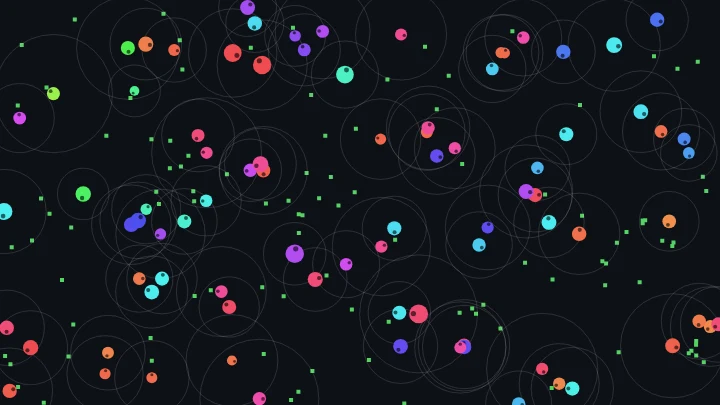
The predators and prey world, colored by what each creature is doing: gray wanders, green goes to eat food, red hunts a smaller creature and yellow runs away. The circles show how far each creature can sense. The dead creatures fade where they died: a red ring marks a creature that was just eaten.
Smooth wandering
The creatures that sense nothing swim in curves that slowly bend one way and then the other, instead of trembling with a new random turn on every step. The evolution is the same, but the world looks calmer and more alive.
How to use the evolution simulator
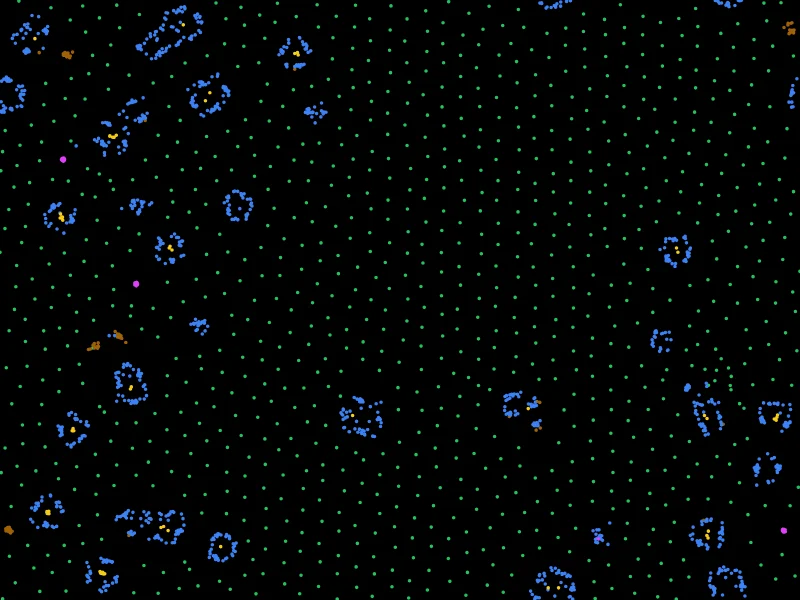
- Watch the world - The simulation starts by itself. The creatures are the colored circles, and the food is the small green squares. Each creature goes to the closest food it can sense, eats it, and splits in two when it is full.
- Follow the evolution on the chart - Below the world, choose the chart: the number of creatures and of food, the average genes, or the speed, the size or the sense range of every creature over time.
- Speed it up (optional) - The world starts at the "Normal" speed, slow enough to follow each creature. Evolution takes many generations, so once you understand what the creatures do, click "Fast", "Very fast" or "Maximum" next to the world to fast-forward.
- Change the world (optional) - Change the food, the costs of the genes, the predators and the seasons while the simulation runs, and see how the creatures adapt. Or start one of the examples.
- Use the mouse (optional) - Click on a creature to see its genes, its energy and its children, or choose to add food, add new creatures or remove the creatures in a circle.
- Download the result - Download the current frame as a PNG image, the chart as an image, the data as a CSV file, or create an animated GIF or a WebM video.
Configuration parameters
The first creatures
| Field | Description |
|---|---|
| Number of creatures | The number of creatures placed at random positions when the world starts. |
| Speed | The speed gene of the first creatures. A speed of 1 moves 1 pixel per step. The creatures always move at their full speed. |
| Size | The size gene of the first creatures. A size of 1 is a circle with a radius of 5 pixels. The mass of a creature, and so its energy needs, grows with the cube of its size: a creature of size 2 weighs 8 times more than a creature of size 1. |
| Sense range | The sense gene of the first creatures. A sense range of 1 lets a creature see the food and the other creatures up to 50 pixels away. |
| Variation between them | With 0, all the first creatures have exactly the same genes. Larger values give each of them different genes around the chosen values: with 0.5, most genes are between 0.37 and 2.7 times the chosen value. Only the genes that evolve are changed. |
| Food at the start | The pieces of food already in the world when it starts. |
| Random seed | Everything that happens by chance (the positions, the wandering, the mutations) comes from this number. The same seed and the same settings always give exactly the same simulation. Click the dice button to try another one. |
| Start the world again | Restarts the simulation with the first creatures, and clears the charts. |
Evolution
| Field | Description |
|---|---|
| Mutation strength | How much the genes of a child differ from the genes of its parent. Each gene is multiplied by a random factor: with 0.1, most children are within 20% of their parent. With 0, the children are exact copies, and only the genes already present can be selected. Strong mutations evolve faster, but make the population less precise. |
| The speed / size / sense range evolves | When a gene doesn't evolve, every creature keeps the value of the first creatures, so you can study the other genes alone. |
| Big creatures eat small creatures | If enabled, a creature can eat another creature that is smaller enough, and runs away from the creatures that can eat it. A creature that senses a predator always runs away first. Otherwise it goes for the closest meal, food or prey. |
| Size ratio to eat another creature | How much bigger a creature must be to eat another one. With 1.2, a creature of size 1.2 can eat creatures of size 1 or smaller. |
| Energy kept from the prey | The fraction of the energy of the prey that the predator gets. The rest is lost. The energy of every creature comes from the food in the end, so the predators can't be more numerous than what the food can support. |
| Maximum age | The creatures that reach this age, in steps, die. With 0, they only die of hunger or eaten. |
Behavior
| Field | Description |
|---|---|
| Smooth wandering (curved paths) | How the creatures move when they sense nothing. Disabled, they take a new random turn on every step, so they tremble and change direction often. Enabled, their turn changes a little on every step, so they swim in smooth curves that slowly bend one way and then the other. It doesn't change the evolution much, but the world is calmer to watch. |
| Turning while wandering | How much the wandering creatures turn: 1 is the normal amount, 0 makes them go straight until they sense something, and larger values make them turn more, in tighter curves with the smooth wandering. |
Food
| Field | Description |
|---|---|
| Where the food grows | Everywhere, in a few patches (the oases), more and more towards the right side of the world, or mostly in the center. Enable "Show where the food grows" to see it. |
| Food per step | The pieces of food that grow on every step. It sets how many creatures the world can feed. It can be a fraction: 0.5 grows one piece every two steps. |
| Maximum food | The food stops growing when there are this many pieces in the world. |
| Energy of each food | The energy a creature gets by eating one piece of food. A creature can't hold more energy than its capacity, so a small creature wastes a part of a big meal. |
| Seasons | With 0, the food always grows at the same rate. With larger values, it grows more in the summer and less in the winter: with 1, nothing grows in the middle of the winter, and twice the food grows in the middle of the summer. |
| Length of a year | The number of steps of a whole year, summer and winter. |
Energy
| Field | Description |
|---|---|
| Cost of living | The energy that a creature of size 1 spends on every step just to stay alive. It is multiplied by the mass (size³). |
| Cost of moving | The energy spent to move, multiplied by the mass and by the square of the speed, like a kinetic energy. Doubling the speed costs 4 times more energy, but only finds about twice more food. |
| Cost of sensing | The energy spent to sense, multiplied by the sense range. |
| Energy to have a child (size 1) | The most energy a creature of size 1 can hold. When a creature is full, it splits in two: the child gets half of the energy. The capacity grows with the mass, so a creature of size 2 holds 8 times more energy, and has bigger children. |
| Maximum number of creatures | The creatures don't have children anymore when there are this many. It keeps the simulation fast if the food is too abundant. |
Mouse
| Field | Description |
|---|---|
| Click on the canvas to |
|
| Radius | The radius of the circle, in pixels, where the food or the creatures are added or removed. |
Appearance
| Field | Description |
|---|---|
| Color of the creatures |
The drawn size of a creature is its real size, and the dark dot is its eye, which shows where it is going. |
| Show the sense ranges | Draws a circle around each creature, as far as it can sense. |
| Show the food, show where the food grows | Shows or hides the food, and colors the places where the food grows (not shown when it grows everywhere). |
| Show the dead creatures for a while | Draws the creatures that die at the place where they died, fading until they disappear, so you can see where and how often the creatures die. Disabled by default: the deaths are then not even recorded. |
| Visible for (steps) | How long a dead creature stays visible, in steps of the simulation. 180 steps last 3 seconds at the Normal speed. It is counted in steps, not seconds, so at a high speed the dead creatures disappear just as fast as everything else happens, and the world doesn't fill with them. When the simulation is paused, they stay as they are. |
| Show the cause of death | Draws each death in a different way: a creature that starved fades in its own color, a creature that was eaten leaves a red ring that grows and fades, a creature that died of old age leaves an outline, and a creature removed with the mouse leaves a gray cross. If disabled, every dead creature fades in its own color. |
| Food color, background color | The colors, in hexadecimal value. For example, use #000000 for a black background. |
World size
| Field | Description |
|---|---|
| Resolution, width and height | The size of the canvas, which is also the size of the world. When it changes, the creatures and the food keep their relative positions. With the same food per step, a larger world has the same number of creatures, more spread out. |
| Wrap around the edges | If enabled, the creatures that leave the world come back on the other side, as if the world were the surface of a donut (a torus). If disabled, the edges are walls and the creatures bounce on them. |
Animation control and charts
| Button or value | Description |
|---|---|
| Speed (steps per second) | The number of simulation steps computed every second. The buttons choose a speed: Slow (20 steps per second), Normal (60, about one step per frame on most screens), Fast (600), Very fast (3000) and Maximum (as many steps as your computer can compute). If your computer can't compute all the steps in time, it computes fewer, so the page never freezes. With 0, the world is frozen. |
| Start, Pause, Resume, Stop, One step | Control the simulation. "Start" (or "Restart") creates a new world with the first creatures. |
| Average generation | The number of ancestors between the creatures alive now and the first creatures, on average. The newest generation is the creature with the most ancestors. |
| Chart |
The chart always shows the whole simulation, with up to 600 moments. |
| Download the chart, download the data | Download the current chart as a PNG image, or the history of the population and of the average genes as a CSV file, which you can open in a spreadsheet. |
| Reset all the options | Restore every option to its default value, and start a new world. |
Animated GIF and video
| Field | Description |
|---|---|
| Format | An animated GIF, which plays everywhere, or a WebM video, which is smaller and has better colors. The animation starts from the current state of the world. |
| Number of frames | The number of frames of the animation, up to 3000. |
| Steps per frame | The number of simulation steps between two frames. Higher values give a faster animation in fewer frames. |
| Frames per second | The speed at which the frames are played. |
How the simulation works
On every step, each creature:
- Looks around - It finds the closest food, the closest smaller creature it can eat and the closest bigger creature that can eat it, within its sense range.
- Decides where to go - Away from the predator if there is one, otherwise towards the closest meal. If it senses nothing, it wanders around, turning a little at random.
- Moves and eats - It moves at its speed, and eats the food or the prey it reaches.
- Spends energy - It spends size³ × (cost of living + cost of moving × speed²) + cost of sensing × sense range. A creature with no energy left dies.
- Has a child - When its energy reaches its capacity (the energy to have a child × size³), it splits in two. The child gets half of the energy, and the genes of its parent multiplied by small random factors.
Every gene is a trade-off. A fast creature reaches the food before the others, but the energy of moving grows with the square of the speed. A long sense range finds more food, but costs energy on every step, even when there is nothing to find. A big body protects against the predators and holds bigger meals, but the cost of everything grows with the mass. The best values depend on the world: how much food there is, where it grows, and who eats whom. No creature knows them: the population finds them by trial and error, one mutation at a time.
This is the idea of natural selection, described by Charles Darwin and Alfred Russel Wallace in 1858. Three things are enough: the individuals are different from each other, their differences are inherited by their children, and some differences help to have more children. Then the helpful differences become more common with every generation, without any plan. This simulator has all three, so it evolves by itself, like real living things.
Frequently Asked Questions (FAQ)
What is an evolution simulator?It is a program where virtual creatures live, reproduce and die, and their children inherit their traits with small random changes. With nothing more, the traits of the population change over the generations to fit the world: the simulation evolves by natural selection, like real life.
Why do the creatures get faster (or slower)?Because the speed is a trade-off. A faster creature finds more food, but moving fast costs a lot of energy. When the creatures are too slow, the faster ones eat more and leave more children, so the speed goes up. When they are too fast, they spend more than they find, so the speed goes down. The population settles where the balance is best for its world.
Why do the creatures get bigger when there are predators?Because a creature can only be eaten by a creature at least 1.2 times bigger than itself (with the default settings). Growing a little puts a creature out of reach of many predators, and lets it hunt more prey. Without predators, a big body is mostly a cost, and the creatures stay smaller.
Why do all the creatures end up with the same color?The color is a gene with no effect, so it changes only by chance. Over time, some families die out and others spread, until the whole population descends from a few ancestors, with close colors. Biologists call this genetic drift. In the "Survival of the fittest" example, selection does it much faster.
All my creatures died. What happened?The food couldn't feed them, or the predators ate all the prey and then starved. It happens with little food, strong seasons, or high costs. Start the world again with more food per step, lower costs or another seed, or add new creatures with the mouse.
How long does evolution take?A generation takes a few hundred steps with the default settings, and the genes change visibly in a few thousand steps. At the "Normal" speed, you can follow each creature, but evolution is slow. Click "Very fast" or "Maximum" to see several generations per second.
Is this how real evolution works?The principle is the same: variation, inheritance and selection. Real living things are much more complex: they have thousands of genes, they reproduce with two parents, and their world changes as they evolve. The simulator keeps only three genes and simple rules, so you can see the principle at work.
Is my simulation uploaded to a server?No. Everything runs in your browser, on the HTML canvas. Nothing is uploaded, and the images, GIFs, videos and data you download are generated on your own computer.
Can I use the generated images and videos?Yes. You are free to use and share the generated images and videos on YouTube, TikTok, or any other social media or website, and to use the simulator in your classes. Attribution is not required but appreciated.
Related tools